
LICHYX Medical Inventory Management System Pro – Track Every Batch. Catch Every Expiry.
$249.00
💭 Is Expired Stock Quietly Eating Your Profit?
Medicines expiring at the back of the shelf, fast movers running out, purchase bills in one file, sales in another… and the same worry every month: “How much stock do we really have — and how much of it can we actually sell?”
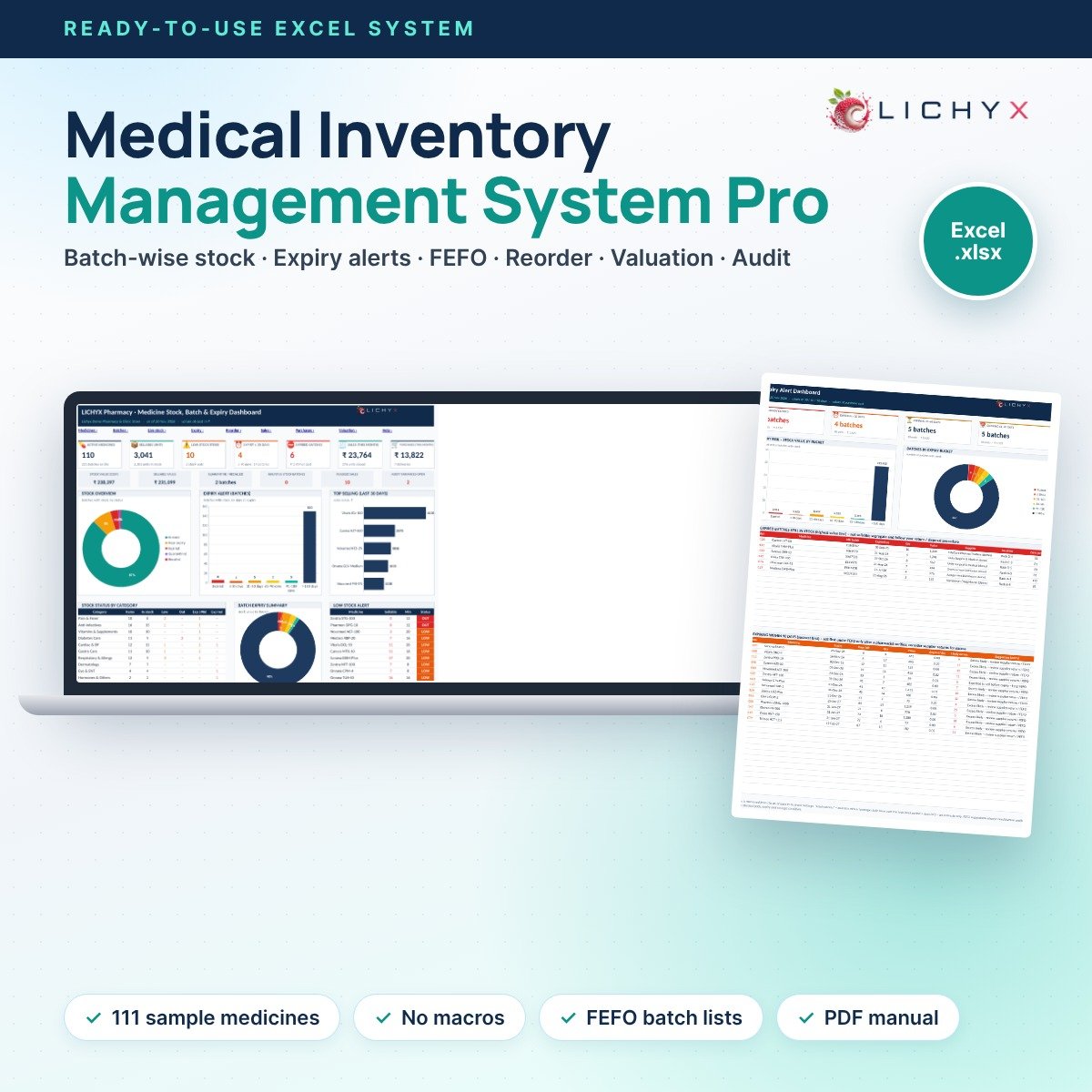
The LICHYX Medical Inventory Management System Pro tracks your stock batch by batch in one clean Excel workbook — with expiry alerts, FEFO support, reorder suggestions and a professional pharmacy dashboard.
🚀 What Is the LICHYX Medical Inventory Management System Pro?
It’s a premium, formula-driven Excel workbook built for small pharmacies, clinics, medical stores and healthcare stockrooms that don’t need a full ERP.
You record medicines, suppliers, batches, purchases, sales or issues and stock adjustments. The workbook keeps batch-wise stock up to date automatically, separates sellable stock from expired, quarantined and recalled stock, suggests which batch to sell first (FEFO), shows what to reorder, values your inventory and reconciles physical counts.
Every register has a built-in “Checks” column that flags expired-batch sales, negative stock, duplicate IDs and FEFO skips — and typed sales above sellable stock are blocked.
No macros, no add-ins, no subscriptions. Just open it in Excel and start managing.
🔥 Are You Facing These Challenges?
✔ You find expired medicines only when a customer or inspector points them out.
✔ Fast-moving items run out while slow movers pile up.
✔ You don’t know which batch of a medicine should be sold first.
✔ Stock on paper never matches stock on the shelf.
✔ Recalled or temperature-damaged batches get mixed with good stock.
✔ You can’t easily see what your inventory is worth — or how much is unsellable.
✔ Supplier dues and delivery delays are hard to track.
If this sounds familiar, this system gives you clarity and control over every batch on your shelves.
📖 What’s Inside? (17 Smart Sheets)
1. Start Here
Overview, set-up steps, daily workflow, data-entry rules and important limitations.
2. Business Settings
Business name, address, GSTIN, drug licence reference, currency, expiry alert days, block sale window and reorder defaults.
3. Medicine Master
Generic and brand name, strength, dosage form, stock unit, pack size, manufacturer, category, HSN, GST, storage, minimum stock and status.
4. Supplier Database
Contacts, GSTIN, licence details, address and payment terms.
5. Batch Master
Manufacturer batch, mfg and expiry dates, supplier, purchase price, selling price, MRP, opening stock, location and recall / quarantine status.
6. Purchase Register
Receipts with discount, GST, invoice reference, payments and lead time.
7. Sales / Issue Register
Batch dropdown sorted earliest expiry first, automatic pricing and safety checks.
8. Stock Adjustment Register
Returns, damage, expiry write-offs, supplier returns, recalls and count corrections.
9. Live Stock Register
Batch-wise stock, value, days to expiry, status, sellable quantity, FEFO rank and search.
10. Batch Ledger
Complete movement history of any batch with a running balance.
11. Expiry Alert Dashboard
Expired and 30 / 60 / 90-day buckets with quantity, value and charts.
12. Low Stock & Reorder
Stock-out warnings, suggested reorder quantities and estimated cost.
13. Supplier Performance
Purchases, lead times, outstanding payments and batch quality by supplier.
14. Stock Valuation
Batch, medicine and category value, with expired and quarantined value shown separately.
15. Purchase & Sales Analysis
Monthly trends, top-moving medicines and slow-moving stock.
16. Management Dashboard
KPIs, stock overview, expiry alerts, top sellers, category status, low-stock alerts and trend charts.
17. Audit & Reconciliation
Physical count vs system stock, variance, adjustment reference and reviewer.
🎯 Who Is This For?
✔ Small Retail Pharmacies and Medical Stores
✔ Clinics and Nursing Homes with an In-house Dispensary
✔ Hospital and Healthcare Stockrooms
✔ Pharmacy Owners Who Want Clear Numbers Without an Expensive ERP
📦 What Will You Get?
📗 Excel System with Fictional Demo Data (111 Medicines, 221 Batches, 665 Transactions)
📄 Blank System Ready for Your Stock
📘 Illustrated PDF User Manual
📊 Sample Stock Report & Sample Expiry Alert Report (PDF)
✅ Formula & Inventory Validation Checklist
🔁 FEFO Batch Lists & Expiry Alerts Built In
🛡 No Macros — Works in Excel 2010 to Microsoft 365, Mac and Web
♾ Lifetime Access
🔄 Free Future Updates
⚡ Smart Stock Control. Fewer Expiry Losses. Better Decisions.
An honest note: this is an inventory record-keeping tool. It does not replace legally required pharmacy software, statutory registers (including those for scheduled or controlled medicines) or prescription controls. Excel cannot fully enforce transaction rules, keeps no tamper-proof audit trail and is not built for simultaneous multi-user editing.
It contains no medical or dosing advice, and no regulatory approval or certification is claimed. FEFO and reorder suggestions need a pharmacist’s verification — we recommend a qualified pharmacy professional reviews your set-up before use.
What it gives you is a clear, batch-wise view of your stock that helps you sell first what expires first, reorder on time and spot problems early.
🚀 Take Control of Your Pharmacy Stock Today with the LICHYX Medical Inventory Management System Pro.
👉 Buy Now | Instant Digital Download


Reviews
There are no reviews yet.